DevForum3か月前
アニメーションインポートの改善
Animation Import Improvements
要約(日本語)
Robloxは、リグスケールやレストポーズソース、リグタイプなどの新設定をアニメーションクリップエディターのインポーターに追加しました。また、3Dモデルのインポート時にアニメーションデータが自動的にAnimSavesに保存されるようになり、クリエイターの制作ワークフローが大幅に効率化されます。
English summary
Roblox has introduced several enhancements to the Animation Clip Editor Importer, including new settings for Rig Scale, Rest Pose Source, and Rig Type. Additionally, animations from imported 3D models are now automatically saved to the AnimSaves folder, streamlining the workflow for creators.
UpdateFeatureHype
元記事を読む →+85Vibe
Vibe スコア
-100 〜 +100
コミュニティの反応
DevForum
→ Neutral0 eng↗
このトピックは10分後に自動的に公開されました。
This topic was automatically opened after 10 minutes.
DevForum
→ Neutral0 eng↗
bballerblox:スタッドのサイズは0.28メートル、つまり11.02インチか。ふむ、興味深いね。とにかく、いいアップデートだ!自分はあまりアニメーション作らないけどね。
bballerblox: stud is 0.28 meters, or 11.02 inches. Hmm interesting. Anyways cool update! I don’t animate much tho
DevForum
→ Neutral0 eng↗
神アップデート!ついにアニメーションのインポートが爆速になった🎉
W update! Finally i can import animations faster🎉
DevForum
→ Neutral0 eng↗
動画クリップをアップロードしようとしているのですが、読み込み中で止まってしまい、アップロードを試みると「64 errors eror 721×646 200 KB」というエラーが表示されます。
I’m trying to upload a video clip, but it got stuck loading and when I try to upload, I get 64 errors eror 721×646 200 KB
DevForum
→ Neutral0 eng↗
昨日同じエラーが出ましたが、スタジオを再起動すれば直りますよ。
I got the same error yesterday, you have to restart the studio
DevForum
→ Neutral0 eng↗
ということは、Meshyなどで作成した馬(やその他のアニメーション付きアセット)をStudioにインポートする場合、アニメーションも一緒にインポートされるようになったということでしょうか?また、読んだところによるとアニメーションとして保存されるようですが、その場合、後から自分で再設定(アタッチ)する必要があるのでしょうか?
Does thas mean when I import a horse (or any other asset with animation) into Studio from Meshy (for instance) - the animation will now be imported with it ? And from what I read… it is saved under animations… .. so does that mean I will have to re-attach it then ?
DevForum
→ Neutral0 eng↗
Blenderで作成した通りの見た目や動きで、カスタムリグのアニメーションをインポートできるようになりますか?
does it make it so i can import animations with custom rigs with it being exactly like how it was in blender?
DevForum
→ Neutral0 eng↗
おそらくその通りだと思います。以前のRobloxでは、Motor6Dに変換されるボーンのC0回転を(0, 0, 0)に強制するという不可解な仕様がありました(一体なぜそんなことをしたのか本当に謎です)。その結果、R6やR15といった様々なキャラクターとの互換性は維持されていたものの、実質的にすべてのボーンの回転をハードコードしなければなりませんでした。
I think that’s probably the case. Roblox used to do the bizarre thing of forcing the C0 rotation of bones that would be converted into Motor6D s to (0, 0, 0) (seriously, why?) As a result, while it remained compatible with various R6/R15 characters, we effectively had to hardcode every bone’s rotati
DevForum
→ Neutral0 eng↗
So the canon height of r6 Robloxians is like 4’6? Damn, thats crazy. Good update doe
DevForum
→ Neutral0 eng↗
64 errors?! Are you trying to debug an SSH server?! Hopefully this gets fixed soon.
DevForum
→ Neutral0 eng↗
why would roblox use the worst possible way it can possibly think of
DevForum
→ Neutral0 eng↗
w update now allow us to change the default animations without having to publish the place first
DevForum
→ Neutral0 eng↗
Hi @TQNY2 , Yes! This update allows you to have greater configurability over the animations you upload into Studio. The saved under animations section refers to a specific folder under ServerStorage, called AnimSaves. This folder opens when you work on an animation in the Animation Clip Editor. New
DevForum
→ Neutral0 eng↗
Hi @sakura_soyuta and @AB_XIl , We understand the difficulties of working with Blender and other such tools, especially given all the weird quirks of our different systems! The Interoperability team at Roblox is specifically working on improving these workflows. We have an option in the 3D Importer
DevForum
→ Neutral0 eng↗
Oh, I didn’t realize this already existed. I may have missed it because the name wasn’t immediately obvious to me, and I don’t recall seeing it in the documentation either. The documentation could always be improved with a pr later, but it might also be worth considering whether the naming could be
DevForum
→ Neutral0 eng↗
私が提案していた機能は、実は少し異なるものです。3Dインポーターでリグ付きキャラクターをインポートする際、一部のボーンがMotor6Dに変換される場合、それらのボーンの回転を(0, 0, 0)にリセットするのではなく、グローバル回転を保持するオプションが必要です。簡単に言うと、
The feature I was suggesting is actually something different. When importing a rigged character through the 3D Importer, if some bones are converted into Motor6D s, there should be an option to preserve those bones’ global rotations instead of zeroing them out to (0, 0, 0) . To put it more simply, u
DevForum
→ Neutral0 eng↗
アニメーション用のフェイシャルコントローラーのアップデートをぜひ見たいです。
I’d love to see an update on the face controller for animation
DevForum
→ Neutral0 eng↗
なぜか64個もエラーが出てしまった。ただ公開したいだけなのに。
idk why I got 64 errors; I’m just trying to publish it
DevForum
→ Neutral0 eng↗
BlenderのモデルやアニメーションをRobloxにエクスポート・インポートする際、苦戦している方をよく見かけます。私が検証し記録した内容に基づき、トラブルを避けるためのヒントをまとめました。アニメーションさせないものを含め、すべての頂点に対してボーンを作成してください。そうしないと、頂点が……
Well, I see some people struggle with exporting and importing Blender models and animations into Roblox. Based on everything I’ve tested and noted down, here are some tips so you won’t run into any issues: Create bones for ALL model vertices , even the ones that won’t be animated. Otherwise, vertice
コミュニティの過去の類似反応
→ Neutral1,274,044 eng↗
YouTubeRobloxの戦闘アニメーション練習 - Moon Animator #roblox #robloxanimation #moonanimator #animation なんとなく楽しんで作ってみました。4時間かかったけど。Robloxアニメーション練習 - Moon Animator チャンネルメンバーシップに登録して特典をゲットしよう:...
Roblox Fight Animation Practice - Moon Animator #roblox #robloxanimation #moonanimator #animation just kinda had fun with it took 4 hours tho Roblox Animation Practice - Moon Animator Join this channel to get access to perks: ...
↑ Positive1,301,236 eng↗
YouTubeリニア vs イージングの乱用 - Moon Animator比較動画。えーっと、これだよ!指摘したかったのはこれ!1!11 みんなが待ち望んでいた愛すべき動画だよ、@SillyEveryDay(へへへは)(晒し者にしてたらごめんね…
Linear VS Easing Abuse - Moon Animator Comparison yeah uh, heres the point i was pointing out!1!11 your long awaited beloved video,@SillyEveryDay (heheheha) (sorry if im shaming ...
↑ Positive631,218 eng↗
YouTube最高傑作のローディング画面が完成! #plehlowla #roblox #robloxstudio ソーシャル -- Robloxプロフィール : https://www.roblox.com/users/29040983/profile Robloxグループ ...
MY BEST LOADING SCREEN MADE! #plehlowla #roblox #robloxstudio SOCIAL -- Roblox Profile : https://www.roblox.com/users/29040983/profile Roblox Group ...
→ Neutral981,784 eng↗
YouTubeどこを改善すべきかコメントで教えてください! #shorts #roblox #blender #animation Discordサーバーにもぜひ参加してください(なんとなくでOKです♂️) Discord: https://discord.gg/6YqNKkGQUY Robloxグループも同じくこちらから: グループ: ...
What should i improve tell me in the comments #shorts #roblox #blender #animation Join my Discord Server (Cus why not ♂️) Discord: https://discord.gg/6YqNKkGQUY Same with my roblox group: Group: ...
↑ Positive206,367 eng↗
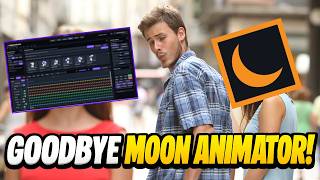
YouTubeこの新しいRobloxアニメーションツールがすべてを変える!Moon Animatorよ、さらば。何年もの間、Robloxでコメント欄のリクエストに応えたアニメーションやカットシーン、トレーラー、シネマティック映像を作り続けてきたけれど、ついに自分で……
This New Roblox Animation Tool Changes EVERYTHING! Goodbye Moon Animator After years of making Roblox Animating Your Comments animations, cutscenes, trailers and cinematics, I finally decided to build ...
X
→ Neutral322 eng↗
✅ モーションキャプチャーアニメーションをStudioにインポートして編集可能に ✅ あらゆるリグでIK(インバースキネマティクス)が利用可能に ✅ ワークフローとUIを改善 Studioのアニメーションエディターに大幅なアップデートを行いました。ぜひ詳細をご確認ください。発表内容はこちら:https://t.co/flqCtTphCy #Roblox #RobloxDev https://t.co/5xe07tEGYh
✅ Import and work with mocap animations in Studio ✅ IK on any rig ✅ Improved workflow and UI We've made major improvements to the Studio animation editor - you'll want to read these. Check out our announcement: https://t.co/flqCtTphCy #Roblox #RobloxDev https://t.co/5xe07tEGYh
→ Neutral1,417 eng↗
TikTokスタジオでIK制作中 \\ #roblox #robloxanimation #zillgo
IK In Studio \\ #roblox #robloxanimation #zillgo